An illustrated map
for your invitation
From the station exit to the hall on the 3rd floor — so no guest gets lost. No app needed: guests open a link and get directions from where they are.
Make one for free3 minutes · no sign-up · free during beta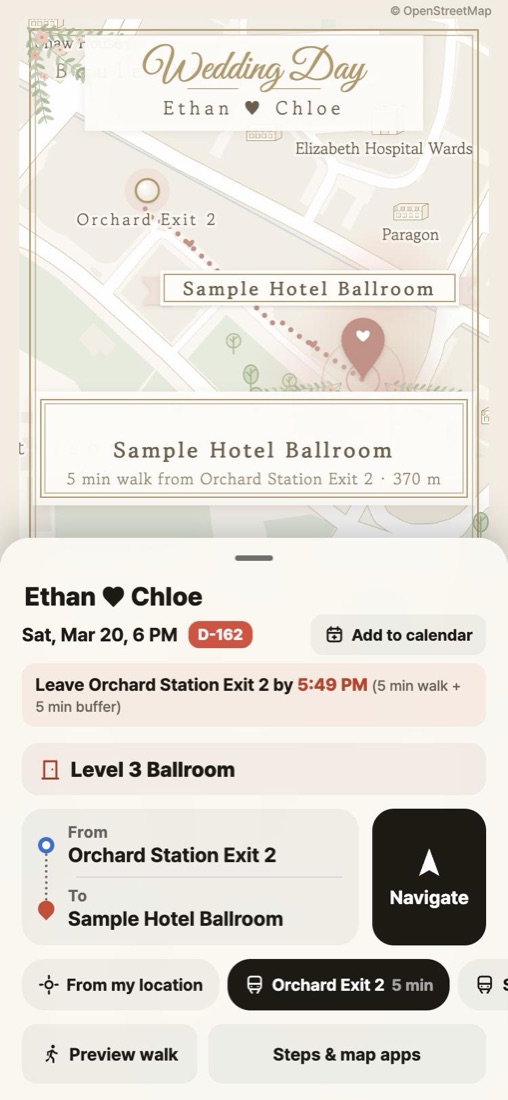
No more calls on the morning of the wedding
- “Which exit do I take?”
- “Where’s the car park entrance?”
- “Which floor? Where is the reception?”
How it differs from a regular invitation map
- From the exit to the doorEvery turn drawn out. Guests can preview the walk, then follow live directions on the day.
- What guests ask, up frontFloor and hall, reception, parking, shuttle stop — and when to leave to be on time.
- Matches your invitationA wedding-style theme, an image for your e-invite, and a QR code for paper invitations.
How it works
- Search for your venue
- Pick a style, add names and the floor
- Paste the link into your invitation, or save the image and QR
FAQ
- Do guests need an app?
- No. They just open the link — it opens inside WhatsApp and other chat apps too.
- Do you store guests’ locations?
- No. Location is used only on the guest’s phone to draw the route.
- Can overseas guests read it?
- Yes — it shows in English, Korean, Japanese or Traditional Chinese to match the guest’s phone.
Price
Free during the beta. Links made in the beta keep working as long as the service runs. Guests never pay.